
Why is the orange light blinking, and how can I fix the mode switch error?Updated 2 hours ago
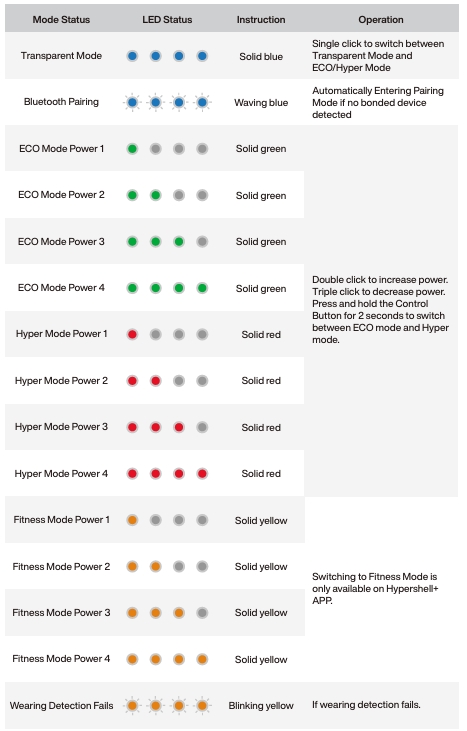
A blinking orange light on the Hypershell exoskeleton indicates a failed wearing detection. This often happens when a leg strap is too loose, preventing the sensor from recognizing proper wear.
How to Fix It:
1. Adjust the Leg Strap
- Tighten the strap to ensure a snug, secure fit on your leg.
- Avoid overtightening—just ensure consistent contact with the sensor area.
2. Try wearing detection again
- After adjusting the leg straps, follow the instructions in the app to press the power button or click the "try again" option in the app to complete the wear detection again.
3. Check the Light Indicator
- Once the exoskeleton detects a proper fit, the yellow light should stop blinking.
- The light will either become solid or change to a different color depending on the selected mode.
For detailed information on mode-specific light indicators, please refer to the mode lighting guide in your user manual or on the Tutorials section of our website.
If the issue persists or you need additional assistance, don’t hesitate to contact our customer support team. We’re here to help.