
Why does the Hypershell Exoskeleton motor generate heat?Updated 2 hours ago
Is it normal for the motor to feel warm?
Yes, it is normal for the motor to feel warm during use. The motor is a mechanical structural device that produces power to assist movement. Like any powered device, it generates some heat when operating.
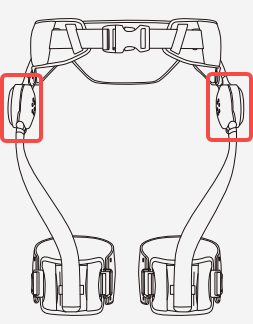
How can I prevent the motor from overheating?
To avoid excessive heat buildup:
Keep some space between the motor and your body. A finger’s distance is recommended to prevent heat accumulation.
Take breaks if you feel the motor getting too hot.
What should I do if the motor gets too hot?
If the motor temperature feels too high:
Check your firmware version – update to the latest firmware if you haven’t already.
Enable Thermal Protection Control (TPC) – in the Hypershell+ app, activate the TPC.
Max Cool: Prioritizes maximum safety and minimizes device temperature as much as possible. When the temperature threshold is reached, it may limit motor performance to achieve cooling;
Balanced: Balances cooling effect and device performance, suitable for all-around daily use scenarios. Only moderate motor current limiting is applied when the higher temperature threshold is reached;
Performance: Prioritizes maximum device power output with minimal cooling intervention. It allows a higher temperature limit and may increase heat risk under sustained high-load use.
Switch the Thermal Protection Control to Max Cool in order to ease up the discomfort.
How do I update my firmware and activate the TPC?
Open the Hypershell+ app and check for firmware updates. Install the latest firmware if available.
Navigate to MotionEngine and activate the TPC.
For more information or further assistance, visit our support page.