
How do I manage multiple devices in the Hypershell app?Updated an hour ago
If you own more than one Hypershell device, you can easily manage and switch between them using the Hypershell+ app. Follow these steps:
1. Access Your Devices
Open the Hypershell+ App
Tap the Profile at the bottom right corner

Select “My Device” from the menu

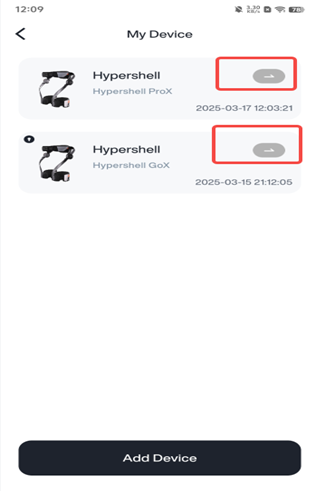
2. Select a Device
A list of your connected Hypershell devices will appear
Tap the button on the right side of the device you want to manage
3. Perform Desired Actions
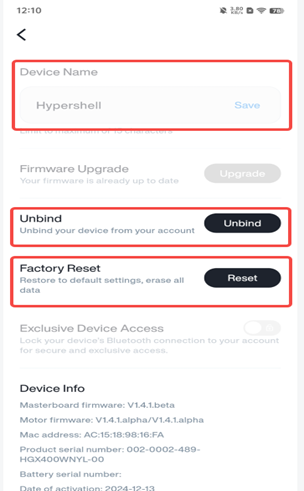
Once selected, you can take actions such as:
Switching between devices
Renaming the device
Updating firmware or settings
This functionality allows you to seamlessly manage multiple devices from a single account, making it convenient to personalize each device based on your needs. If you need help managing your device list or encounter connection issues, contact Hypershell customer support for assistance.